

In the vibrant universe of gaming, where strategy meets adrenaline and fantasy intertwines with reality, the quest for the ultimate gaming experience often leads enthusiasts down a thrilling path: building a custom gaming PC. This journey not only allows you to create a powerhouse tailored to your unique preferences and gaming styles, but it also opens the door to a deeper understanding of technology and the components that drive our digital adventures. In an age where pre-built systems flood the market,the allure of a custom setup resonates louder than ever,empowering gamers to curate their own technological marvels. Whether you’re an aspiring esports champion, a dedicated role-player, or a casual seeker of digital worlds, embarking on the project of creating your own rig is an chance to express your identity through the medium of technology. Join us as we explore the essential steps to building a custom gaming PC, ensuring that your next gaming escapade is not just immersive but also backed by the unique capabilities of a machine crafted by your own hands. Welcome to the ultimate guide to assembling your dream gaming rig—where performance meets personalization.
Table of Contents
- Choosing the Right Components for Optimal Performance
- Mastering the Art of Assembly: From Motherboard to Graphics Card
- Cooling Solutions and Power Management for Extended Gaming Sessions
- Essential Tips for Software Setup and Troubleshooting Your Build
- Q&A
- In Summary

Choosing the Right Components for Optimal Performance
| Component | Entry Level | Mid Range | High End |
|---|---|---|---|
| CPU | AMD Ryzen 5 5600G | Intel Core i7-12700K | AMD Ryzen 9 5900X |
| GPU | NVIDIA GTX 1650 | AMD RX 6600 XT | NVIDIA RTX 3080 |
| RAM | 16GB DDR4 | 32GB DDR4 | 64GB DDR4 |
| Storage | 1TB HDD | 512GB SSD + 2TB HDD | 1TB NVMe SSD + 4TB HDD |

Mastering the Art of Assembly: From Motherboard to Graphics Card
| Graphics Card | VRAM | Performance | Price |
|---|---|---|---|
| NVIDIA RTX 3080 | 10GB GDDR6X | Excellent 4K performance | $699 |
| AMD Radeon RX 6800 | 16GB GDDR6 | Solid 1440p performance | $579 |
| NVIDIA RTX 3060 | 12GB GDDR6 | great 1080p performance | $329 |

Cooling Solutions and Power Management for Extended Gaming Sessions
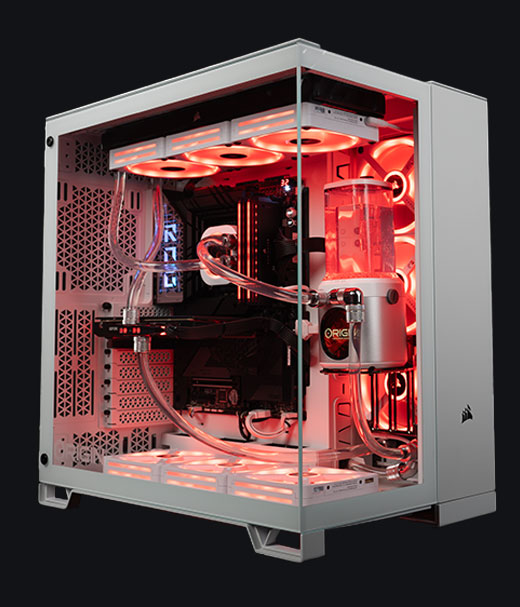
to maximize your gaming performance, high-quality cooling solutions are essential for preventing overheating during those intense gaming marathons. Whether you opt for a custom water cooling loop or a robust air-cooling setup, the right solution can significantly enhance your PC’s longevity and stability. Consider integrating components such as:
- CPU Coolers: Choose models with high thermal conductivity and low noise levels to maintain an ideal temperature.
- Case Fans: Ensure proper airflow within your case by utilizing both intake and exhaust fans to create efficient heat dissipation.
- Thermal Paste: Apply a high-quality thermal paste to enhance heat transfer between your CPU and cooler.
In addition to cooling, effective power management is crucial for sustained gaming sessions. A reliable power supply unit (PSU) ensures stable voltage and prevents unexpected shutdowns,which can disrupt gameplay and possibly damage components. Look for PSUs that are 80 Plus certified to guarantee energy efficiency. When selecting a PSU, its wise to consider features such as:
| Power Supply | Wattage | Certification | Modular |
|---|---|---|---|
| Corsair RM750x | 750W | Gold | Fully Modular |
| Seasonic Focus GX-650 | 650W | gold | Fully Modular |
| EVGA SuperNOVA 600 G5 | 600W | Gold | Fully Modular |
With the right cooling and power management solutions in place, you can enjoy uninterrupted gaming sessions, no matter how demanding the game may be.
Essential Tips for Software Setup and Troubleshooting Your Build
- Check for overheating components and clean out dust from fans.
- Adjust in-game graphics settings based on benchmark results.
- Verify that all cables and connections are fully secure.
- Reinstall any problematic software or game titles.
| Benchmark Tool | Platform | Key Features |
|---|---|---|
| 3DMark | Windows | Comprehensive GPU testing and scoring |
| Heaven Benchmark | Windows / Linux | Real-time graphics rendering tests |
| FurMark | windows | Stress testing for GPUs with OpenGL |
| Unigine Superposition | Windows / Linux | Advanced visual fidelity and interactive benchmarks |
Q&A for “How to Build a Custom Gaming PC: A Step-by-Step Guide” Q1: What are the basic components I need to build a gaming PC? A1: To build a custom gaming PC, you will need several key components: the central processing unit (CPU), graphics processing unit (GPU), motherboard, memory (RAM), storage (SSD or HDD), power supply unit (PSU), and a case to house everything. Additionally, consider input devices (keyboard, mouse) and a monitor.
Q2: How do I choose the right CPU and GPU for my gaming needs? A2: Your choice of CPU and GPU depends largely on the types of games you play and your budget. For high-performance gaming, a CPU like Intel’s core series or AMD’s Ryzen series, coupled with a strong GPU like NVIDIA’s GeForce RTX series, is recommended. assess benchmarks and compatibility with your motherboard before making a decision.
Q3: What is the importance of selecting the right motherboard? A3: The motherboard is crucial as it connects all your components. Ensure it is indeed compatible with your CPU and has adequate ports for your needs. Features to consider include the form factor (ATX, Micro-ATX), number of RAM slots, and support for the latest technologies (like PCIe 4.0 for faster SSDs).
Q4: How much RAM do I really need for gaming? A4: The general recommendation for gaming is at least 16GB of RAM. This ensures smooth multitasking and adequate performance for most modern games. For intensive tasks like streaming or running multiple applications simultaneously, consider upgrading to 32GB.
Q5: Should I go for an SSD or HDD for my storage? A5: SSDs are usually recommended for gaming due to their faster load times, resulting in quicker game launches and reduced lag during gameplay. HDDs can be used for bulk storage of files and less frequently played games, as they are typically more cost-effective per gigabyte.
Q6: What tools do I need to build the PC? A6: Building a PC generally requires a Phillips screwdriver, anti-static wristband (to avoid static damage), and cable ties for institution. A work space with good lighting is helpful, along with a guide or tutorial for specific steps during assembly.
Q7: Can I troubleshoot issues on my own if something goes wrong? A7: Yes, many issues can be troubleshot with some basic knowledge. common problems include incorrect cable connections or improper seating of components. Consulting online forums or manufacturer websites can provide support and solutions for various issues.
Q8: Is it more cost-effective to build or buy a prebuilt gaming PC? A8: Building your own PC can often be more cost-effective, as you can select components that fit your budget and needs. Though, prebuilt gaming PCs, such as those offered by CyberPowerPC, can save time and come with warranties and support, which might potentially be appealing for beginners.
Q9: How do I ensure my gaming PC stays cool? A9: Cooling is essential for maintaining performance. Make sure to use a case with sufficient airflow and consider adding additional fans or a liquid cooling system if you’re planning to overclock your CPU or GPU. Regular maintenance, such as cleaning dust from fans and components, also helps in keeping temperatures down.
Q10: What trends should I be aware of in gaming technology? A10: Keep an eye on trends such as the rise of ray tracing for more realistic graphics, advancements in AI-driven game development, and the increasing relevance of virtual reality (VR) gaming. Additionally, hardware is continually evolving, so staying updated on new CPU and GPU releases is beneficial for future upgrades.
In Summary
As we conclude our journey through the process of building your own custom gaming PC,it’s clear that the craft of assembling your dream machine is a rewarding endeavor. From selecting the right components that suit your gaming aspirations to mastering the assembly process, you’ve gained valuable insights into the world of gaming technology. Remember, every gamer’s needs are unique, and a custom PC allows you to tailor your rig to nail the perfect blend of performance and style. Now that you have the knowledge to construct your own gaming powerhouse, don’t stop here—dive deeper into the universe of gaming and tech. Explore more resources, tips, and exciting products to enhance your gaming setup at adgear.co.za. Whether you’re looking for high-performance components or innovative peripherals,ther’s a wealth of options waiting for you. Happy building and game on!
